User Management
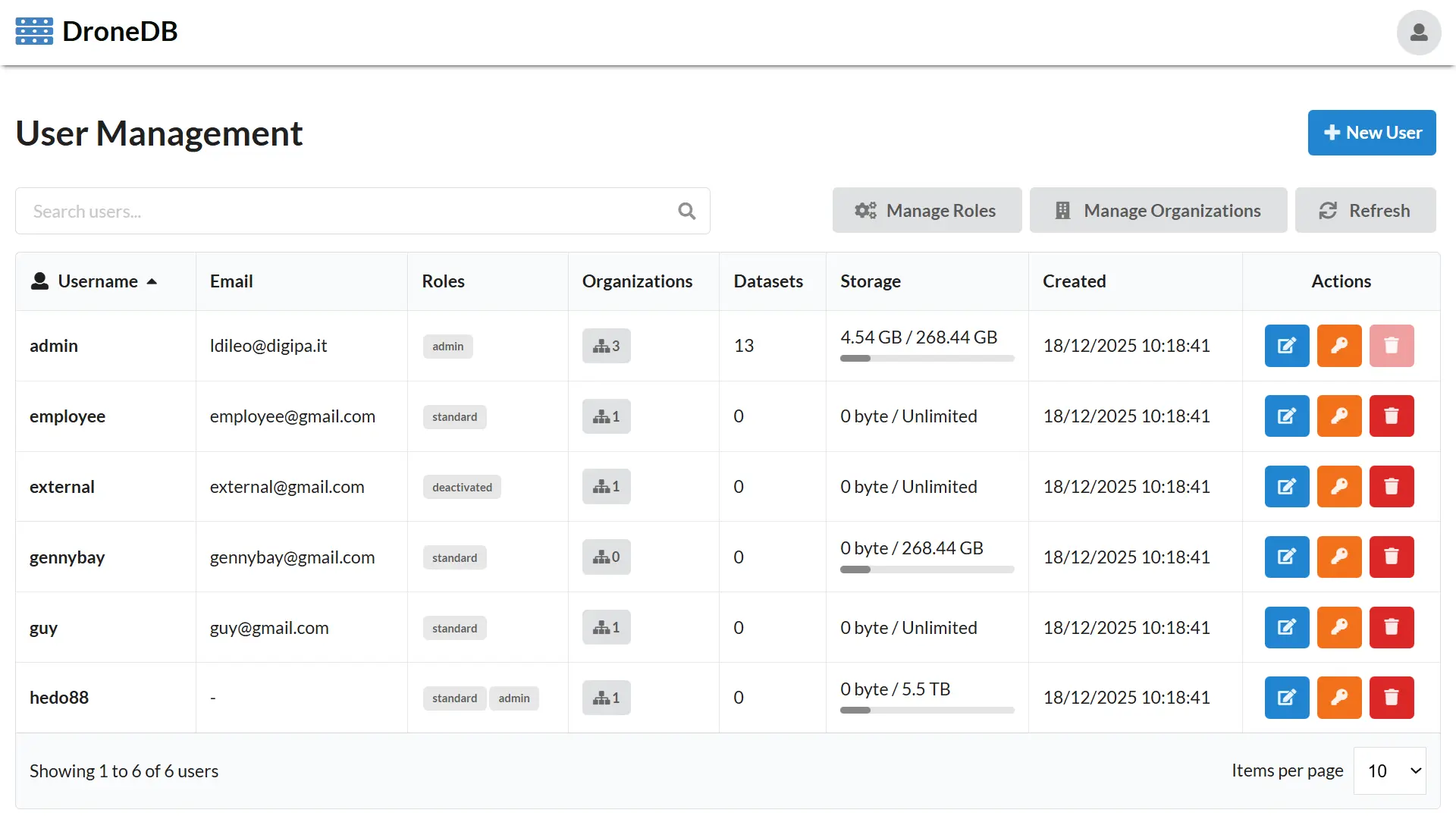
Registry includes a comprehensive user management system with role-based access control (RBAC), organization management, and storage quotas. This guide covers all aspects of managing users in a Registry deployment.
For information on basic Registry setup and configuration, see the Registry documentation.
Overview
The user management system provides:
- User Administration: Create, update, and delete user accounts
- Role-Based Access Control: Define custom roles and assign permissions
- Organization Membership: Control which organizations users can access
- Storage Quotas: Limit storage usage per user
- Authentication: JWT-based authentication with support for external providers
- Metadata Management: Store custom user attributes
User Accounts
Default Admin Account
When Registry starts for the first time, a default administrator account is created:
| Field | Default Value |
|---|---|
| Username | admin |
| Password | password123 |
admin@example.com |
Change the default password immediately after first login. Navigate to /account or use the API to update credentials.
You can customize the default admin in appsettings.json:
{
  "DefaultAdmin": {
    "Email": "admin@yourdomain.com",
    "UserName": "admin",
    "Password": "your-secure-password"
  }
}
Creating Users
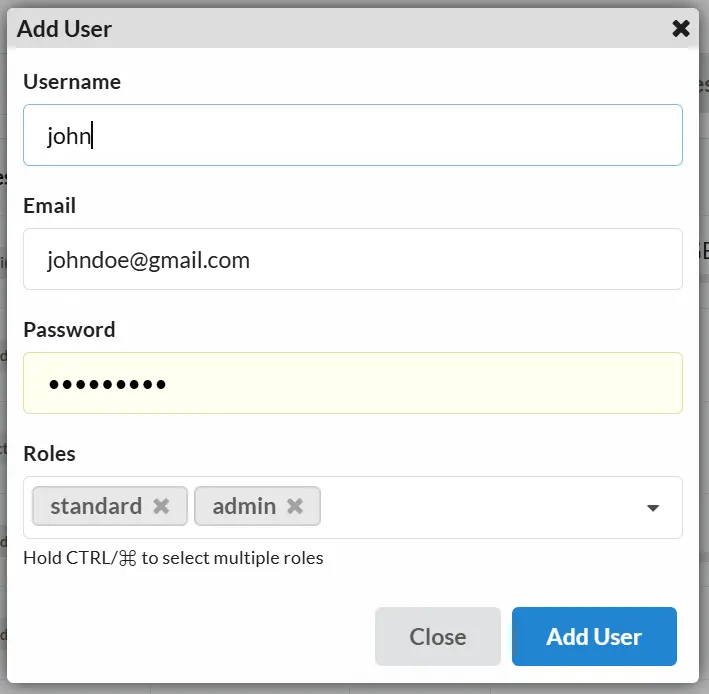
Administrators can create new users through the web interface or API.
Via Web Interface
- Log in as an administrator
- Navigate to Settings → Users
- Click Add User
- Fill in the required fields:
- Username: Unique identifier (alphanumeric, no spaces)
- Email: Valid email address
- Password: Secure password
- Roles: Select one or more roles
- Click Create
Via REST API
curl -X POST http://localhost:5000/users \
  -H "Authorization: Bearer <admin-token>" \
  -H "Content-Type: application/json" \
  -d '{
    "userName": "newuser",
    "email": "newuser@example.com",
    "password": "securepassword123",
    "roles": ["user"]
  }'
Response:
{
  "userName": "newuser",
  "email": "newuser@example.com",
  "roles": ["user"],
  "organizations": []
}
Viewing Users
Administrators can view all registered users.
Basic User List
GET /users
Returns:
[
  {
    "userName": "admin",
    "email": "admin@example.com",
    "roles": ["admin"],
    "organizations": ["default-org"]
  },
  {
    "userName": "user1",
    "email": "user1@example.com",
    "roles": ["user"],
    "organizations": ["project-a", "project-b"]
  }
]
Detailed User List
For more detailed information including storage usage:
GET /users/detailed
Returns:
[
  {
    "userName": "user1",
    "email": "user1@example.com",
    "roles": ["user"],
    "organizations": ["project-a"],
    "storageQuota": 10737418240,
    "storageUsed": 5368709120,
    "organizationCount": 1,
    "datasetCount": 5,
    "createdDate": "2024-01-15T10:30:00Z"
  }
]
Updating Users
Update user information including email and roles:
curl -X PUT http://localhost:5000/users/username \
  -H "Authorization: Bearer <admin-token>" \
  -H "Content-Type: application/json" \
  -d '{
    "email": "newemail@example.com",
    "roles": ["user", "editor"]
  }'
Deleting Users
Remove a user account:
curl -X DELETE http://localhost:5000/users/username \
  -H "Authorization: Bearer <admin-token>"
Deleting a user does not automatically delete their organizations or datasets. Consider transferring ownership before deletion.
Password Management
Changing Own Password
Users can change their own password:
curl -X POST http://localhost:5000/users/changepwd \
  -H "Authorization: Bearer <token>" \
  -H "Content-Type: application/x-www-form-urlencoded" \
  -d "oldPassword=currentPassword&newPassword=newSecurePassword"
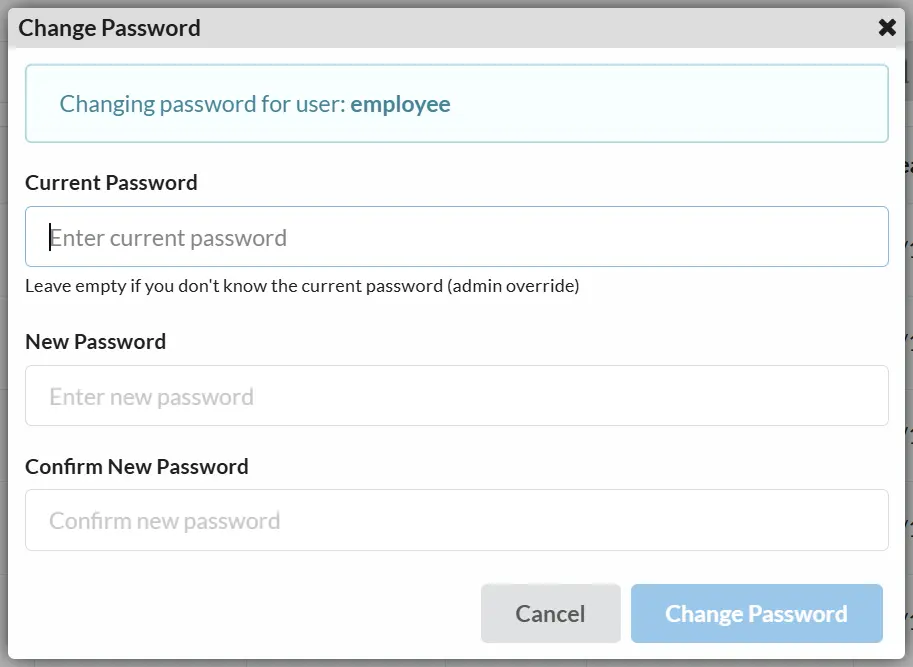
Admin Password Reset
Administrators can change any user's password:
curl -X PUT http://localhost:5000/users/username/changepwd \
  -H "Authorization: Bearer <admin-token>" \
  -H "Content-Type: application/json" \
  -d '{
    "currentPassword": null,
    "newPassword": "newSecurePassword"
  }'
When an admin changes another user's password, the currentPassword field can be omitted or set to null.
Roles and Permissions
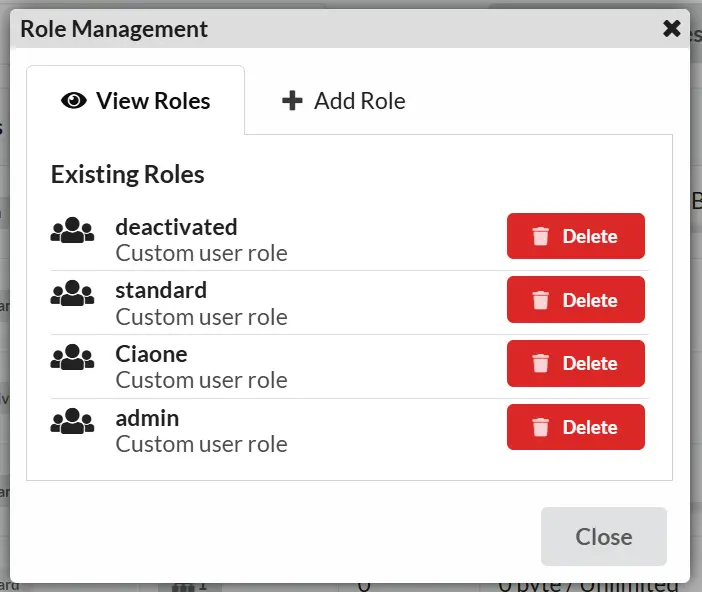
Registry uses a role-based access control system. Users can have one or more roles that determine their permissions.
Built-in Roles
| Role | Description | Permissions |
|---|---|---|
admin | System administrator | Full access to all features |
user | Standard user | Create/manage own organizations and datasets |
Custom Roles
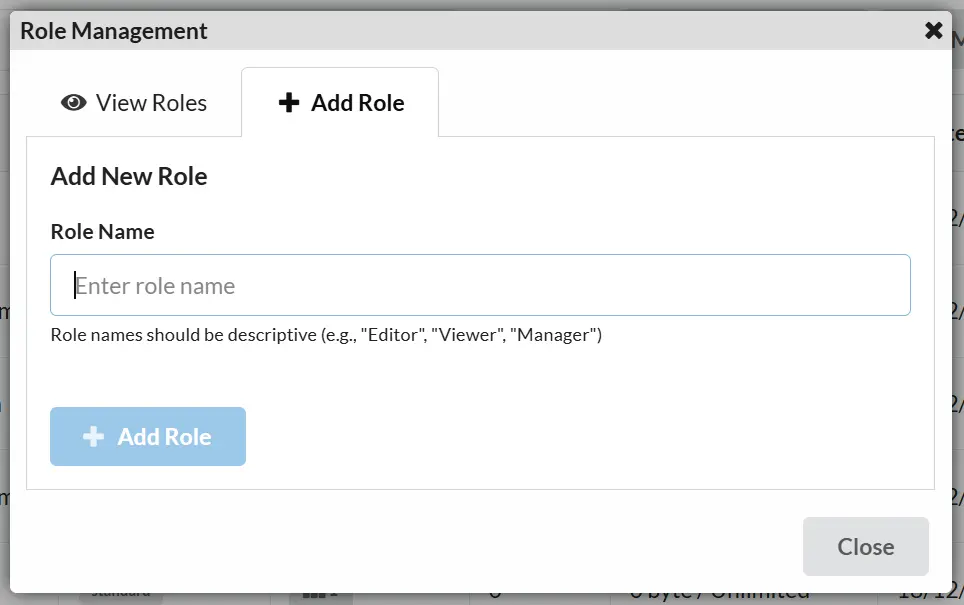
Administrators can create custom roles for fine-grained access control.
Creating a Role
curl -X POST http://localhost:5000/users/roles \
  -H "Authorization: Bearer <admin-token>" \
  -H "Content-Type: application/json" \
  -d '{
    "roleName": "editor"
  }'
Listing Roles
curl http://localhost:5000/users/roles \
  -H "Authorization: Bearer <token>"
Response:
["admin", "user", "editor", "viewer"]
Deleting a Role
curl -X DELETE http://localhost:5000/users/roles/rolename \
  -H "Authorization: Bearer <admin-token>"
The admin role cannot be deleted. Ensure no users are assigned to a role before deleting it.
Assigning Roles to Users
Roles are assigned when creating or updating a user:
curl -X PUT http://localhost:5000/users/username \
  -H "Authorization: Bearer <admin-token>" \
  -H "Content-Type: application/json" \
  -d '{
    "email": "user@example.com",
    "roles": ["user", "editor"]
  }'
Organizations
Organizations group datasets and users. Users must belong to an organization to create and manage datasets within it.
Default Organization Behavior
By default, when a new user is created, Registry automatically creates a personal organization with the user's username as the slug. This allows users to immediately start creating datasets.
For enterprise deployments where organizations are managed centrally, this behavior can be disabled:
{
  "AppSettings": {
    "EnableDefaultUserOrganization": false
  }
}
When disabled, new users will not have any organization until an administrator assigns them. See Configuration Reference for details.
Organization Structure
| Field | Description |
|---|---|
slug | Unique URL-friendly identifier |
name | Display name |
description | Optional description |
owner | Username of the organization owner |
isPublic | Whether the organization is publicly visible |
creationDate | When the organization was created |
Managing User Organizations
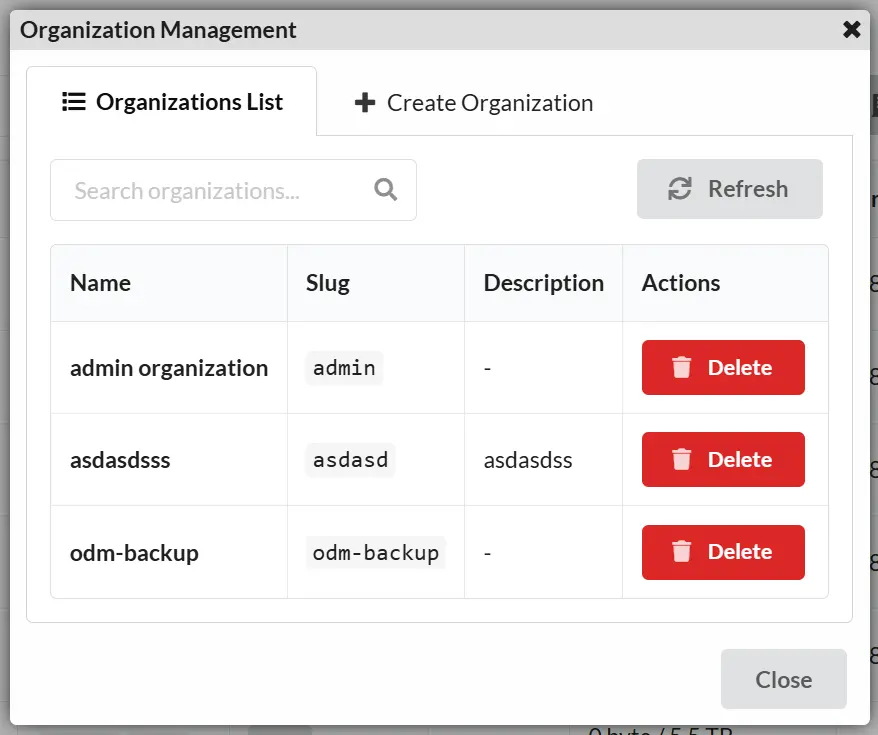
View User's Organizations
curl http://localhost:5000/users/username/orgs \
  -H "Authorization: Bearer <admin-token>"
Response:
[
  {
    "slug": "project-alpha",
    "name": "Project Alpha",
    "description": "Main project organization",
    "creationDate": "2024-01-01T00:00:00Z",
    "owner": "admin",
    "isPublic": true
  }
]
Assign Organizations to User
curl -X PUT http://localhost:5000/users/username/orgs \
  -H "Authorization: Bearer <admin-token>" \
  -H "Content-Type: application/x-www-form-urlencoded" \
  -d "orgSlugs=project-alpha&orgSlugs=project-beta"
Creating Organizations
curl -X POST http://localhost:5000/orgs \
  -H "Authorization: Bearer <token>" \
  -H "Content-Type: application/x-www-form-urlencoded" \
  -d "slug=my-org&name=My Organization&description=A new organization&isPublic=true"
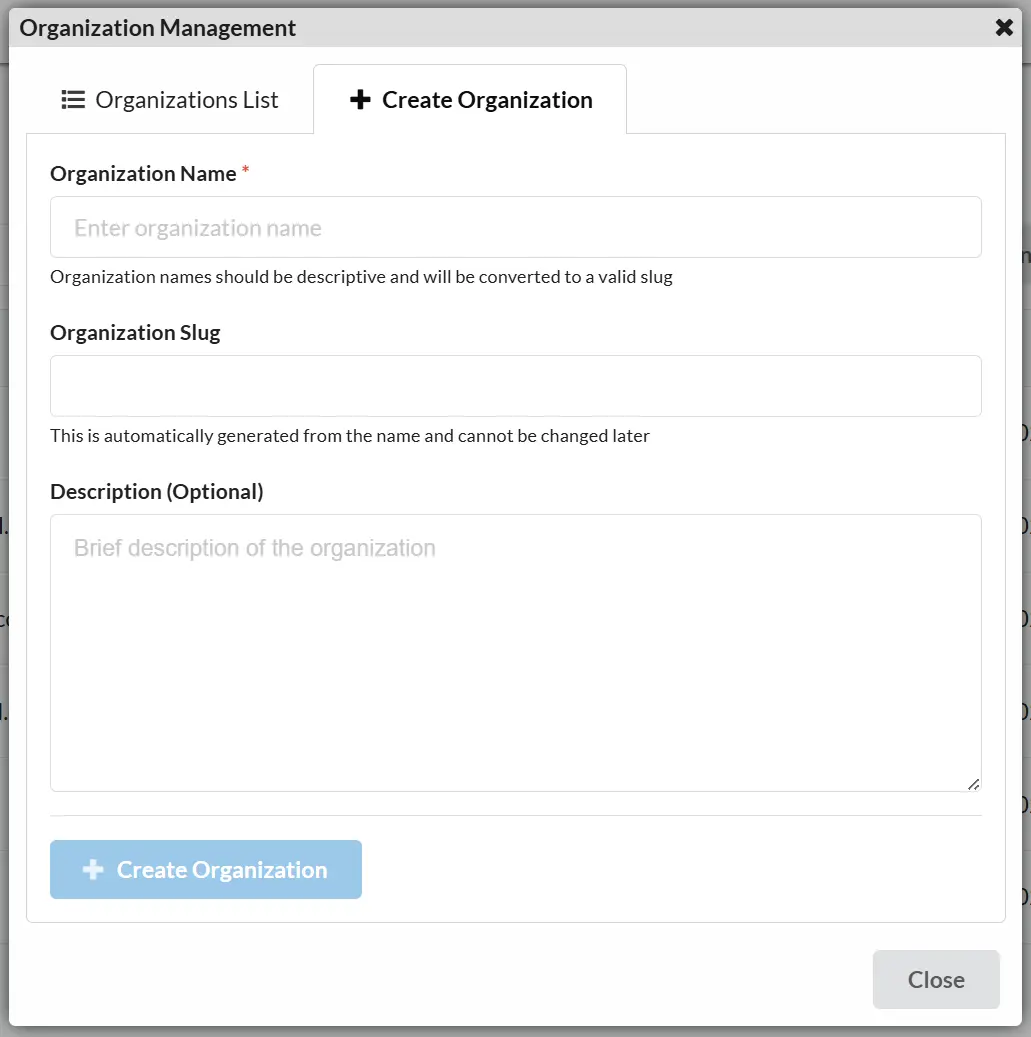
Updating Organizations
curl -X PUT http://localhost:5000/orgs/my-org \
  -H "Authorization: Bearer <token>" \
  -H "Content-Type: application/x-www-form-urlencoded" \
  -d "name=Updated Name&description=Updated description&isPublic=false"
Deleting Organizations
curl -X DELETE http://localhost:5000/orgs/my-org \
  -H "Authorization: Bearer <token>"
Deleting an organization will delete all datasets within it. This action cannot be undone.
Storage Quotas
Registry can limit storage usage per user when EnableStorageLimiter is enabled.
Enabling Storage Limits
In appsettings.json:
{
  "EnableStorageLimiter": true
}
Setting User Storage Quota
Storage quotas are set via user metadata using the maxStorageMB key:
curl -X POST http://localhost:5000/users/username/meta \
  -H "Authorization: Bearer <admin-token>" \
  -H "Content-Type: application/json" \
  -d '{
    "maxStorageMB": 10240
  }'
This sets a 10 GB (10240 MB) storage limit for the user.
Viewing Storage Usage
Current User
curl http://localhost:5000/users/storage \
  -H "Authorization: Bearer <token>"
Specific User (Admin)
curl http://localhost:5000/users/username/storage \
  -H "Authorization: Bearer <admin-token>"
Response:
{
  "total": 10737418240,
  "used": 5368709120
}
total: Storage quota in bytes (null if unlimited)used: Current storage usage in bytes
Storage Quota Behavior
When storage limits are enabled:
| Scenario | Behavior |
|---|---|
| Under quota | Normal operation |
| At quota | New uploads rejected |
| No quota set | Unlimited storage |
| Quota disabled globally | All users have unlimited storage |
User Metadata
User metadata stores custom attributes as key-value pairs. This is useful for storing additional user information or integrating with external systems.
Getting User Metadata
Current User
curl http://localhost:5000/users/meta \
  -H "Authorization: Bearer <token>"
Specific User (Admin)
curl http://localhost:5000/users/username/meta \
  -H "Authorization: Bearer <admin-token>"
Setting User Metadata
curl -X POST http://localhost:5000/users/username/meta \
  -H "Authorization: Bearer <admin-token>" \
  -H "Content-Type: application/json" \
  -d '{
    "maxStorageMB": 10240,
    "department": "Engineering",
    "customField": "customValue"
  }'
Reserved Metadata Keys
| Key | Description | Type |
|---|---|---|
maxStorageMB | Storage quota in megabytes | number |
roles | Role assignments from external auth | array |
Authentication
JWT Authentication
Registry uses JSON Web Tokens (JWT) for authentication.
Login
curl -X POST http://localhost:5000/users/authenticate \
  -H "Content-Type: application/x-www-form-urlencoded" \
  -d "username=admin&password=password123"
Response:
{
  "token": "eyJhbGciOiJIUzI1NiIsInR5cCI6IkpXVCJ9...",
  "expires": "2024-01-22T10:30:00Z",
  "userName": "admin",
  "email": "admin@example.com",
  "roles": ["admin"]
}
Token Refresh
Refresh an active token before expiration:
curl -X POST http://localhost:5000/users/authenticate/refresh \
  -H "Authorization: Bearer <token>"
Token Configuration
In appsettings.json:
{
  "Secret": "your-long-random-secret-key",
  "TokenExpirationInDays": 7,
  "AuthCookieName": "jwtToken"
}
Use a strong, unique Secret for JWT signing. The secret should be at least 32 characters and generated using a cryptographically secure random number generator.
External Authentication
For enterprise deployments, Registry supports external authentication providers.
Configuration
In appsettings.json:
{
  "ExternalAuthUrl": "https://auth.yourdomain.com/api/authenticate"
}
Behavior
When ExternalAuthUrl is configured:
- Local user management is disabled
- Users cannot be created, updated, or deleted locally
- All authentication is delegated to the external provider
- User roles and metadata come from the external provider's response
- The
/users/management-enabledendpoint returnsfalse
Checking Management Status
curl http://localhost:5000/users/management-enabled
Response:
true- Local user management is enabledfalse- External authentication is configured
API Reference
Users Endpoints
| Method | Endpoint | Description | Auth |
|---|---|---|---|
POST | /users/authenticate | Authenticate user | No |
POST | /users/authenticate/refresh | Refresh JWT token | Yes |
POST | /users | Create new user | Admin |
GET | /users | List all users | Admin |
GET | /users/detailed | List users with details | Admin |
PUT | /users/{userName} | Update user | Admin |
DELETE | /users | Delete user | Admin |
POST | /users/changepwd | Change own password | Yes |
PUT | /users/{userName}/changepwd | Change user password | Admin |
GET | /users/roles | List all roles | Yes |
POST | /users/roles | Create role | Admin |
DELETE | /users/roles/{roleName} | Delete role | Admin |
GET | /users/storage | Get own storage info | Yes |
GET | /users/{userName}/storage | Get user storage info | Admin |
GET | /users/meta | Get own metadata | Yes |
GET | /users/{userName}/meta | Get user metadata | Admin |
POST | /users/{userName}/meta | Set user metadata | Admin |
GET | /users/{userName}/orgs | Get user organizations | Admin |
PUT | /users/{userName}/orgs | Set user organizations | Admin |
GET | /users/management-enabled | Check if management enabled | No |
Deleting a user
DELETE /users takes the target in a form-encoded body, not in the URL path:
| Field | Required | Description |
|---|---|---|
UserName | Yes | Username of the account to delete |
Successor | No | Username receiving the organizations, datasets and batches. When omitted, all of the user's data is deleted |
ConflictResolution | No | How to resolve dataset name clashes in the successor's organizations: 0 halt, 1 overwrite, 2 rename (default) |
curl -X DELETE "https://hub.dronedb.app/users" \
  -H "Authorization: Bearer $TOKEN" \
  -d "UserName=jdoe" \
  -d "Successor=archive" \
  -d "ConflictResolution=2"
The response reports how many organizations, datasets and batches were transferred or deleted.
Organizations Endpoints
| Method | Endpoint | Description | Auth |
|---|---|---|---|
GET | /orgs | List all organizations | No |
GET | /orgs/{orgSlug} | Get organization details | No |
POST | /orgs | Create organization | Yes |
PUT | /orgs/{orgSlug} | Update organization | Yes |
DELETE | /orgs/{orgSlug} | Delete organization | Yes |
Best Practices
Security Recommendations
- Change default credentials immediately after installation
- Use strong passwords with a minimum of 12 characters
- Set appropriate token expiration based on your security requirements
- Use HTTPS in production (via reverse proxy)
- Regularly audit user accounts and remove inactive users
- Implement least privilege - assign minimum necessary roles
User Management Workflow
Storage Quota Guidelines
| User Type | Recommended Quota |
|---|---|
| Standard User | 5-10 GB |
| Power User | 50-100 GB |
| Project Lead | 100-500 GB |
| Administrator | Unlimited |
Troubleshooting
Common Issues
Cannot create users
- Verify you have admin privileges
- Check if external authentication is configured (
management-enabledreturnsfalse) - Check server logs for error details
Authentication fails
- Verify username and password are correct
- Check token expiration
- Clear browser cookies and try again
- Verify the
Secretin configuration is consistent
Storage quota not working
- Ensure
EnableStorageLimiteristruein configuration - Verify
maxStorageMBis set in user metadata - Check that the value is a valid number
Cannot delete admin role
- The
adminrole is protected and cannot be deleted - Ensure at least one user has admin privileges
Viewing Logs
Check the Registry logs for detailed error messages:
# Docker
docker-compose logs registry

# Native
cat registry-data/logs/registry.txt
Related Documentation
- Registry Overview - Installation and configuration
- Reference - Command line tools
- STAC API - Data discovery API